


1. Game Overview
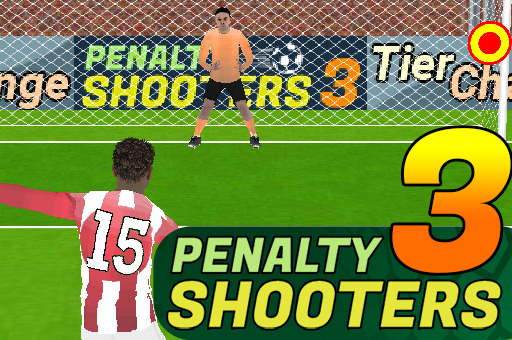
Penalty Shooters 3 focuses on football's most pressurized exchange: one striker, one goalkeeper, and a single kick that can decide a match. Players alternate between both roles, choosing shot power and placement on attack, then reading an indicator and timing a dive on defense. A standard contest uses a sequence of penalty attempts, so success requires complete skill at both scoring and saving rather than mastery of only one side.
Two progression paths provide different challenges. Tier Challenge presents increasingly demanding individual tests, while World Cup play builds the shootout format into a championship journey. Victories award bonuses that can support useful upgrades. Power-ups may improve precision or make conditions more difficult for the opponent, while team naming and kit customization add identity to the run. The mouse or touch control keeps the interface simple, but the moving target and power flame create meaningful timing decisions. A strong shot can still miss, and an early goalkeeper dive can be beaten by a slower ball. Penalty Shooters 3 appeals to players who prefer focused skill challenges over a full football match. Each attempt is short, failure is immediately understandable, and a narrow shootout naturally creates tension. Progression, team customization, and alternating roles give the game enough variety for repeated sessions.
Key Details
- Genre: Penalty shootout, precision sports arcade
- Difficulty Level: Medium to Hard
- Average Play Time: 5–15 minutes
- Best For: Precision players, tournament fans, and quick mouse or touch sessions
Gameplay Video
Penalty Shooters 3 gameplay
2. How to Play
Getting Started
- Name and customize your team, then choose Tier Challenge or World Cup.
- As striker, watch the power indicator and begin the shot with a click or touch.
- Set the target and release at the desired power and direction.
- As goalkeeper, wait for the opponent's target indicator and click or tap its location to dive.
- Score more penalties than the opponent and advance to the next challenge.
Basic Controls
- Shoot: Click or tap, hold to set power and aim, then release at the chosen moment.
- Save: Watch for the target cue and click or tap the indicated area to dive.
- Power-ups: Select or activate them through the displayed interface.
Objective
Win the penalty exchange by scoring more of your attempts while saving the opponent's shots. Continue through tiers or the World Cup bracket.
3. Game Features & Highlights
- ✓ Alternating striker and goalkeeper roles in the same match
- ✓ Tier Challenge and World Cup progression modes
- ✓ Power, placement, target, and dive-timing mechanics
- ✓ Precision and disruption power-ups
- ✓ Custom team name, kit, achievements, and upgrade rewards
4. Tips & Strategies
Beginner Tips
- Use medium power until you understand how quickly the target moves.
- Aim away from the goalkeeper but leave margin inside the posts.
- On defense, wait for the target cue rather than guessing immediately.
Advanced Strategies
- Vary high, low, left, right, and central shots so the keeper cannot follow a pattern.
- Delay a dive slightly against a visibly slower attempt.
- Save high-value power-ups for elimination kicks or difficult tier stages.
What to Watch Out For
- Maximum power narrows the timing window and can send a poorly aimed shot wide.
- Diving before the direction cue is clear gives the striker an easy opposite corner.
5. Game Elements Explained
Shooting Power and Target Placement
A penalty shot combines two related decisions. The power indicator determines how fast or forcefully the ball travels, while the moving target controls placement. High power reduces the goalkeeper's reaction time but can make the target harder to stop accurately. Lower power supports placement yet allows more time for a save. Begin with a balanced setting and aim inside a corner rather than directly at the post. The power flame and on-screen target provide feedback, so use misses to identify whether timing or placement caused the problem. Patterns matter across a shootout. If every kick goes to the same corner, even an AI goalkeeper becomes easier to predict against. Alternate direction and height, and occasionally use the center when the keeper expects an extreme shot. Consistent scoring comes from a repeatable input rhythm plus enough variation to prevent anticipation. Under knockout pressure, preserve the same preparation speed so nerves do not change a reliable release window.
Goalkeeping, Modes, and Power-ups
Goalkeeping replaces control of power with reaction timing. An indicator briefly reveals where the shot is heading, and your click or tap sends the keeper toward that zone. Fast shots require immediate action; slower attempts may punish a dive made too early. Tier Challenge isolates increasingly difficult tests, while World Cup mode links shootout victories into a larger campaign. Rewards can fund power-ups that improve your accuracy or interfere with the opponent through effects such as slippery conditions. Use them strategically rather than automatically. An early easy round is a poor place to spend the strongest advantage if a knockout stage waits ahead. Custom team details and achievements track the identity of the run, but the central progression skill remains balanced practice in both roles. A player who scores perfectly but cannot save will still struggle to win close shootouts. Track whether the opponent repeats speed or direction, then use that evidence without abandoning the visual target cue.
6. Frequently Asked Questions
How do I take a penalty kick?
Click or tap to begin, hold while the power and target systems move, then release when the desired strength and placement align.
What should I do if my goalkeeper always dives too early?
Wait for the target indicator, judge the shot speed, and delay slightly against slower attempts before selecting the save area.
Is this game compatible with mobile devices and browsers?
Yes, the HTML5 controls are suitable for modern desktop and mobile browsers using a mouse or touchscreen.
Can I save my progress?
Team customization, achievements, and mode progress may be saved in local browser storage. Clearing site data can reset them.
How do I unlock upgrades and World Cup progress?
Win Tier Challenge or World Cup shootouts, collect the awarded bonuses, and spend or activate rewards through the upgrade interface.
Categories
Tags